Default Networking Setup
When you create a resource group in evroc, a complete networking environment is automatically configured for you. This default setup includes all the essential components needed to deploy VMs with both internal and external connectivity.
What gets created automatically
Each new resource group includes:
- Virtual Private Cloud (VPC) - An isolated network environment for your resources
- Subnet - A private IP address range (
10.0.0.0/24) for VM-to-VM communication - External Gateway - A NAT gateway for routing traffic between your VPC and the internet
- Default Security Group - Firewall rules controlling network traffic to and from VMs
These resources are created automatically and cannot be deleted separately from the resource group.
How the components work together
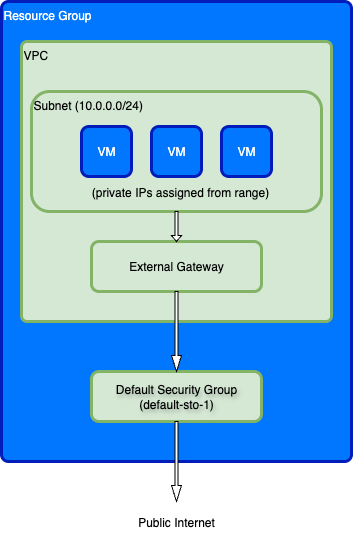
VPC and Subnet
The VPC provides network isolation for your resources. The default subnet (10.0.0.0/24) provides 252 usable private IP addresses for your VMs. Each VM is automatically assigned a private IP from this range when created.
External Gateway
The external gateway is a NAT gateway that handles routing between your VPC and the public internet:
- Outbound traffic: Enabled by default for all VMs. Traffic uses a shared IP address unless you attach a Public IP to the VM
- Inbound traffic: Requires you to attach a Public IP to the VM and configure appropriate security group rules
Default Security Groups
All resource groups include two preconfigured security groups:
default-sto-1 (automatically applied to VMs):
- Allows all outbound traffic from VMs to the internet
- Allows all inbound traffic from other VMs in the same subnet (within the VPC)
- Blocks all other inbound traffic from external sources
VMs are automatically added to this security group unless you specify different security groups when creating the VM.
default-sto-1-ssh (must be explicitly applied):
- Allows SSH access (port 22) from any IP address (0.0.0.0/0)
- Must be explicitly added to VMs that need SSH access from the internet
This security group provides a convenient way to enable SSH access without creating custom rules. You can add it when creating a VM or update an existing VM to include it.
What you need to configure
While the basic networking is set up automatically, you'll need to configure:
- Public IPs - Create and attach these to VMs that need inbound internet access
- Additional Security Groups - Define custom firewall rules for more granular traffic control
- SSH Keys - Configure SSH access to your VMs
Next steps
- Learn about Virtual Private Clouds (VPCs)
- Learn about Subnets
- Configure Security Groups for custom firewall rules
- Learn how to create VMs
- Learn how to view VPCs and subnets